Showing posts with label Back to School. Show all posts

Saturday, August 5, 2023

WBT Where to Start? Getting Ready


So we have been watching videos, reading the books, reading Facebook group posts and now it is time to get files downloaded, the printer going and planning book open. Time to get ready for the best school year ever!

So what do we NEED to get started with WBT? Here are my must haves to start the year with WBT


1. Need to have some basic knowledge of Whole Brain Teaching

Now more than likely you already have this but just in case you are totally new to Whole Brain Teaching I want to be clear that if you haven't visited WholeBrainTeaching.com and learned the WBT Basics , you should do that FIRST.  You don't need to read EVERY ebook and watch every video to get started but the tools like our Attention Getter Class/Yes will only work if you know the basics of how to use them. I also highly recommend grabbing Chris Biffle's books, especially the newest book, Whole Brain Teaching for Challenging Kids-2nd Edition. You don't have to have the books to get started but they are all easy reads and great to have on hand during the school year.

2. Pick Rule Posters to download and print

I love the official WBT rules and the new early ed version! 


You can get posters for all the official versions of the rules on TPT here. I originally shared more about the 5 rules and the posters I made here. There are a ton of versions on Teachers Pay Teachers but be sure they are free and that they have the 2020 Rule 5 like the official ones or the Bitmoji version

3. Pick a place for the Scoreboard and make traveling Scoreboard


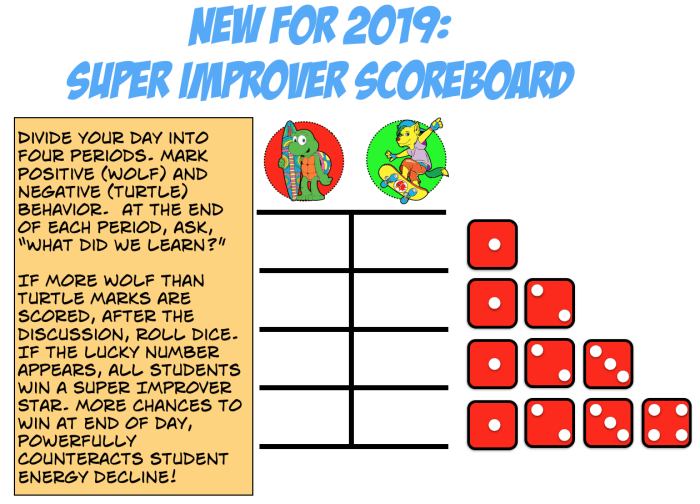
The scoreboard can be just a sad face and a happy face made with marker and the travel scoreboard just a 3 x 5 card. I'm excited to use the latest upgrade of the Scoreboard that is  shared here that is Turtle vs Hawk. The latest version features the sad Emo Turtle but you can also use Surfboard Emo. 

During distance learning and on my phone for a traveling scoreboard I used a digital scoreboard and I updated it to be Turtle vs Hawk


You can also make a simple traveling scoreboard to have on your lanyard 


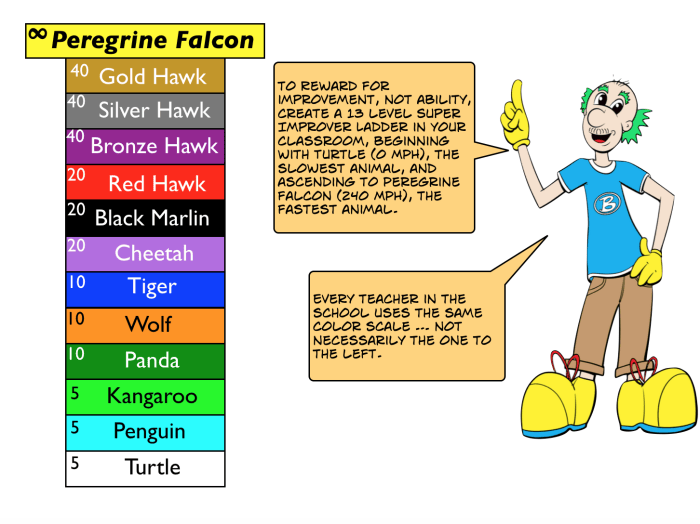
4. Super Improver Wall/ Peregrine Falcon display

Super Improver is one of my WBT must do's. It is truly amazing how this will change your classroom. For me I do not start giving stars until a couple weeks into school but I want my Super Improver Wall and Peregrine Falcon display up before Day 1 if possible. I use a version with photos of real animals and organize the levels in a rainbow-ish order. You can get the posters I use HERE and here is one version of the cards. They are also in Spanish :) 


5. Create your Games List 

You want to make your Games List near your Scoreboard. You can just write it on your white board, use sentence strips with a pocket chart or use Google Slides and project it on to the main board.
Click on the Whiteboard set up picture below for the WBT First Days Cue Cards I am updating. You can print them on blank 4 x 6 cards or just project from Google Docs
The Games List is basically your schedule with what you are focusing on. Learn more at https://wholebrainteaching.com/day-one/ and by watching Andrea Schindler's Getting Started Periscopes from 2018 & 2019. The Periscopes are listed with some screenshots on the WBTKinderGettingStarted doc


6. Print or Download the Power Pix

Visit this post and this page to see why you need PowerPix in your life. 


As long as you have 1-4 you will be in great shape to start the year using Whole Brain Teaching but I hope you will find 5 and 6 as helpful as I do. I am updating a few more files that I will include here so check soon for updates


Tuesday, May 5, 2020

Teacher Tech- Student Resource page


One of my EdTech Mentor projects is updating the Technology Resources section of my school website. These are some of our K-5th grade resources. I also made a TK Tech page and a Teacher Tech Tips pageWhat do you think? Have you tried out these sites before?


Kiddle is a visual search engine for kids powered by Google, offering safe kids web, image, and video search. Results are vetted by editors

Your child can access most sites with their perminate ID #, their lunch number.  If you need this number, the office or teacher can get it for you.
connect ED icon Reading Curriculum Mc Graw Hill "Wonders"
This website will give you access to what your child is learning in class:

To Log in :
Username:Student Lunch Number pusd (example: 12345pusd)
Password: Student Lunch Number pusd (example: 12345pusd)


Go Math website
Go Math is your child's math curriculum. From this website you will find assignments for your child and access activities your child can do to practice their math skills 
To Log on you need to enter your child's I.D# (lunch number)
And the password given to you or the password you created from the temporary password that was sent home


Wednesday, March 25, 2020

Whole Brain Teaching- Where to Start?

UPDATED 2020

Whether you are new to Whole Brain Teaching or have used WBT for years there is soooo much that is new each year it is easy to feel overwhelmed. I have been using WBT since it was Power Teaching and there is always something new to add to the WBT tool belt. There are just soooo many wonderful ebooks, videos and ideas! Where do you start? When do you start what? What if it is not the beginning of the school year? Can you still start WBT? So many questions but no worries, we can do this!

With Chris Biffle's newest book Whole Brain Teaching for Challenging Kids: Fast Track: Seven Steps to Teaching Heaven, all the amazing Whole Brain Teaching tools have been organized into seven steps. If you are brand new to Whole Brain Teaching, you may only use the first 2 steps or even only Step 1 and I promise you it will be life changing! I of course recommend grabbing all 3 of Coach B's books and using all the tools WBT offers but you can get started right now for FREE, even if the school year has already started, even if you are on break or not in the classroom :)

Step 1 is Super Improver and all you really need is some index cards and a pen. All the info you need to get started is at https://wholebrainteaching.com/intermediate/super-improvers-team/
If Super Improver in the classroom is not exciting enough, there is also Super Improver Family edition! Find out more on the official FaceBook page videos page under the Super Improver playlist and the Super Improver Facebook group
I will share more soon about how I use Super Improver in my classroom and at home.

Step 2 is Character Education and is my favorite part of WBT. Again you can get started for free on the official WBT page and be sure to grab the Character Ed ebook at TpT :) SEL, Social Emotional Learning, is so very important and I believe vital to every classroom, and in PreK and TK it is a part of our Learning Foundations. Whole Brain Teaching makes character education so easy to implement and a part of every school day.
Start your WBT journey with these two steps. Once you are ready to dive deeper, move on to Steps 3, 4 and 5. Ready to dive really deep? Add Step 6 and 7.

Step 3 is Master WBT Basics. This is the How to Teach part of WBT and the part that takes the most time to implement. I can't imagine teaching without the WBT Basics and each year feel a tiny bit closer to mastering these always improving tools.

Step 4 is Gamify Classroom Rules.


Step 5 is Play Scoreboard
https://wholebrainteaching.com/intermediate/scoreboard/


Step 6 is Reforming Bleoved Rascals


Step 7 is Activate Power Ups

Wednesday, July 23, 2014

WBT Wednesday Advance Must Haves


So we got the Classroom Rules, we are ready to use the Core 4, and  last Wednesday we covered the basics needed for the first days.  The 5 Rules, Scoreboard, Class/Yes, Mirror and Teach/OK make the foundation of the WBT classroom and really will change the way you teach forever. For me I can't teach without these WBT tools and the more I use them, the more I love them, the better my class is. If I have a hard day or a lesson does not go well then I can usually find that some thing with the Core Four was off. I didn't use the Scoreboard as much as I should have or I forgot to have the students Mirror or we didn't do enough Teach/OK.   If you are new to WBT, new to teaching or new to a grade level just start with these and you will have such a strong foundation to build your classroom learning on. You will be blown away by how awesome your class becomes just with the Core Four and the Five Rules but just like a house is not only the foundation, WBT is so much more than the Core Four.

Once you are ready with your WBT foundation, you are ready to build up the walls. These are the advanced WBT must haves that you will want to add to your classroom ASAP. Now ASAP will be different for everyone so don't rush, you may not use these your first months or even your first year. That said the great thing about these advanced WBT tools is they are all like brick walls, you can add a few bricks at a time, building on your foundation bit by bit. Today let's take a look at 2 Advance WBT Must Haves, the Super Improvers Team and PowerPix.

The Super Improvers Team is all about rewarding student improvement. This is Level 2 of the Scoreboard and replaces the card system or behavior clip chart. Instead of catching students doing wrong, you are focusing on catching them doing  right, making improvements. This was truly a life altering idea for me and a huge blessing to my classroom. The year starts with the Scoreboard and the Scoreboard keeps going all year but Super Improver Team is added into the WBT classroom and students are rewarded for individual and class wide improvement. Instead of racing other students, students race themselves, working to improve on their own personal best. The beauty is that each student can be racing toward their own goal and students can be working on an academic goal or a behavior goal. Students also work together as a team to improve on class goals, which also can be academic or behavior. WBT founder Chris Biffle explains the Super Improvers Team in Chapter 15 of the book, Whole Brain Teaching for Challenging Kids and the Program 563 Master Class: Super Improver  webcast. The delightful Deanna Schuler did a great video as this tool was developed in 2012 that explains how to set up your wall and award stars.


If possible you will want to plan out your Super Improvers Team now, as you are setting up your room, even though you will not introduce it the first days of school. You will need a spot for your wall and you might want your levels to match your classroom theme. Last year I used photos of sea stars to go with my tropical theme but I am switching themes and haven't decided yet how I will set up my wall. There are MANY themes shared on blogs and on TeachersPayTeachers which should all be free. I try to pin them all on the Super Improvers pinterest board so check it out and hopefully it will help you find the perfect Super Improvers printable for your classroom.


Follow Whole Brain Teachers's board Super Improvers Team on Pinterest.


The second Advance WBT Must Have for me are the PowerPix. I LOVE the PowerPix and usually start introducing them the first week of school because they are a super way to introduce core content to students and are SOOOOOO easy to use. Really they are ready made lessons. The original PowerPix can be found in the ebooks section of http://wholebrainteaching.com/. To access the free ebooks you will need to register here, which is free :) The PowerPix ebooks have the California State Standards and are avalible for K-3rd grade, though many can be used for upper grades. Currently the PowerPix are on page 2 and 3 of the ebooks section.


Over the last few years I have been working on PowerPix with the Common Core standards and have a template for making Electronic PowerPix. You can find the most up to date Common Core PowerPix in this post here. I tried to make them printer friendly with one file of the pix to print in color and a separate file of the teacher notes to print in black. If you need/want to create your own PowerPix you can download my Electronic PowerPix Templates for PowerPoint for free HERE.

Nancy Stoltenberg has a great post with pictures about PowerPix. Click on the picture of her wall below to read the post and don't forget to make sure you are following her.

Since I am in a portable with limited wall space I project the PowerPix we are learning on the screen with the document camera or from my laptop. As we learn the PowerPix I add the printed version that is in a sheet protector to a binder ring and it becomes part of our review routine at the beginning of whole group lessons. I thought I had pictures of the binders but do not so I will take pictures and add them as soon as I can get into my classroom. Like Super Improvers I try to pin PowerPix displays and new PowerPix created by other Wibbiters to the  pinterest board. 

Follow Whole Brain Teachers's board WBT PowerPix on Pinterest.

I know I have just scratched the surface of pinning the wonderful posts about PowerPix and Super Improvers and I want to make sure we get all of them so please comment with links to your PowerPix and Super Improvers posts. If you are just starting with WBT I hope you are now excited to try these tools once you are ready and have what you need to get started. Be sure to come back for more Advanced WBT next Wednesday

Wednesday, July 16, 2014

WBT Wednesday- Getting ready & First Days


So we have been watching the webcasts, reading the book, reading blog posts and now it is time to get files downloaded, the printer going and planning book open. Time to get ready for the best school year ever!

So what do we NEED to get started with WBT? Here are my must haves to start the year with WBT

1. Need to have some basic knowledge of Whole Brain teaching

Now more than likely you already have this but just in case you are totally new to Whole Brain Teaching I want to be clear that if you haven't visited WholeBrainTeaching.com and downloaded the Ebooks like WBT Quickstart Guide or read the book, Whole Brain Teaching for Challenging Kids you need to do that FIRST.  You don't need to read EVERY ebook or the WHOLE book to get started but the tools like the Scoreboard will only work if you know the basics of how to use them.

2. Pick Rule Posters to download and print

I shared about the 5 rules and the posters I use here . You can find posters to match many themes on TeachersPayTeachers and if they are the WBT rules they should be free. Many of these posters and posters from blogs are pinned in the WBT Basics Pinterest board.

Follow Whole Brain Teachers's board WBT Basics on Pinterest.

3. Pick a place for the Scoreboard and make traveling Scoreboard

The scoreboard can be just a sad face and a happy face made with marker and the travel scoreboard just a 3 x 5 card.


If you want to get fancier there are scoreboards with borders and different icons for Teacher vs Students, Boys vs Girls and such. You can even make a digital scoreboard that you can open on your phone!

http://transitionalkinder.blogspot.com/2020/03/advance-scoreboard.html?m=1

4. Download and print First Day cue cards from Deanna Schumer and Sub cheat sheet 

I mentioned both of these last week and they are great to use as is or help you plan how to introduce everything the first days of school


5. Download WBT Intro to print or project in class


In my class I use the laptop hooked up to the lcd projecter ALL the time so I use Intro to WBT lessons I was able to create with the fabulous WBT Construction Kit found in the Free Downloads section of wholebrainteaching.com.

There is an Early Education version for PreK-Kinder and a Primary version for 1st-2nd. If you teach 3rd grade or higher I recommend using the original WBT Intro found at wholebrainteaching.com under Free Ebooks in the Common Core section.


The Early Education Edition is a zipped file with PowerPoint and PDF versions of an 84 page presentation based on work from WholeBrainTeaching.com. The presentation will introduce your students to the Five classroom rules and five of Whole Brain Teaching's basic learning techniques:
Class-Yes, Hands and Eyes, Mirror Words, Teach-Okay, and the Scoreboard.

One PowerPoint and PDF contains teacher note on slides to help newbies and experienced Whole Brain Teachers alike teach these lessons. There is also a PowerPoint and PDF that contains no notes on student slides and limited teacher slides for those that prefer.


The Primary Version is a zipped file with PowerPoint and PDF versions of an 103 page presentation. The presentation will introduce your students to the Five classroom rules and five of Whole Brain Teaching's basic learning techniques: Class-Yes, Hands and Eyes, Mirror Words, Teach-Okay, and the Scoreboard AND a lesson on What is a Sentence?


As long as you have 1-3 you will be in great shape to start the year using Whole Brain Teaching but I hope you will find 4 and 5 as helpful as I do. Coach B will be starting up the webcasts soon and will be talking about starting the first day with WBT but until then you can checkout the WBT First Steps playlist on the webcast youtube channel for past webcasts.

Next time will be all about prepping the classroom for what I am calling advance WBT must haves. I do not introduce them the first day but they become the foundation of most lessons and my student discipline so I like to plan where they will be. What are these jewels of Whole Brain Teaching? Make your guess in the comments and check back soon to see :)
Until next time, TTFN Wibbiters


Transitional Kinder with Mrs. O Template by Ipietoon Cute Blog Design